anti-oom-processor
Anti-OOM Processor

High-performance CSV processing engine designed to handle multi-gigabyte files with a constant low memory footprint. Leveraging Node.js Streams and Backpressure, it prevents “Out-of-Memory” (OOM) crashes common in naive implementations.
💥 The Problem: “It works on my machine”
A common scenario in Node.js backends:
- Marketing uploads a
products.csvfile (500MB, 2 million rows). - The server tries to read the entire file into RAM (
fs.readFile). - Result:
FATAL ERROR: Ineffective mark-compacts near heap limit Allocation failed - JavaScript heap out of memory. The server crashes, restarting all active connections.
This project solves this by treating data as a Flow, not a Block.
✨ Demo
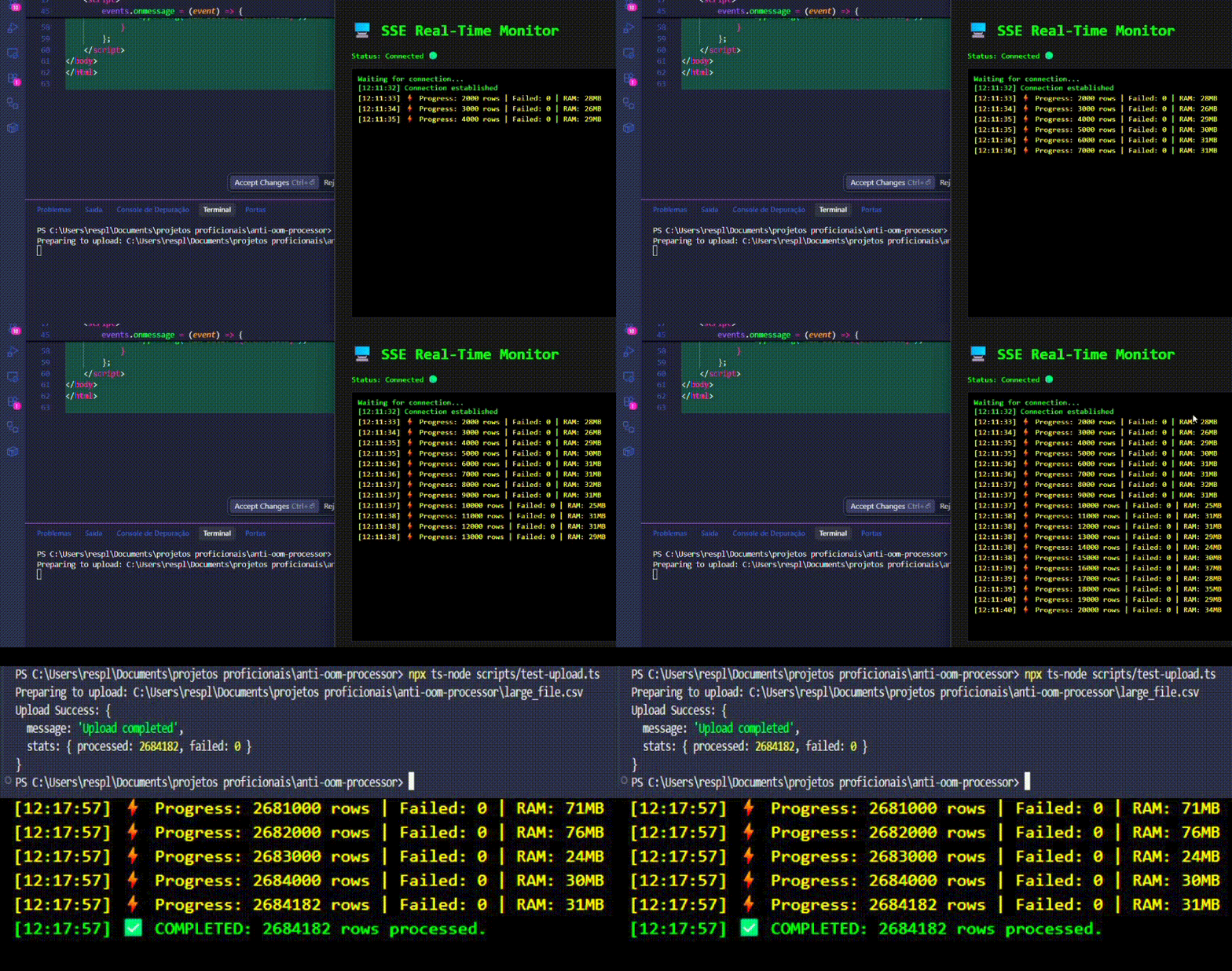
🌊 Architecture & Data Flow
flowchart LR
    Client[Client Upload]
    filesys[Busboy Stream]
    parser[CSV Parser]
    batcher[Batch Processor]
    db[(MongoDB)]

    Client -->|MultiPart Stream| filesys
    filesys -->|Pipe| parser
    parser -->|Row by Row| batcher

    subgraph Memory Protection [Node.js Pipeline]
        direction TB
        batcher -- "Buffer Full (1k rows)" --> db
        db -. "Ack (Backpressure)" .-> batcher
        batcher -. "Pause Reading" .-> parser
    end
Key Technical Concepts:
- Backpressure: The system automatically pauses reading the file if the database writes become slow. The RAM usage never spikes because data “waits” on the disk/network, not in the heap.
- Stream Pipeline: Uses
stream.pipelineto ensure proper cleanup and error handling. If the request is aborted, the file stream closes immediately. - Batch Processing: Instead of inserting 1 row at a time (N+1 problem), we group rows into chunks of 1000 and perform
bulkWriteoperations, increasing Throughput by ~50x.
🛠 Tech Stack
- Runtime: Node.js 20+ / TypeScript
- Framework: Fastify (Low Overhead)
- Streaming Libs:
@fastify/multipart(Busboy wrapper)csv-parse(Streamable Parser)
- Database: MongoDB + Mongoose (Bulk Operations)
- Observability:
- Memory Usage Logging (Heartbeat)
- Server-Sent Events (SSE) for Real-Time Frontend Progress
🚀 Quick Start
1. Requirements
- Node.js 18+
- MongoDB (Local or Atlas)
2. Install Dependencies
npm install
3. Run Locally
# Start MongoDB (if using Docker)
docker-compose up -d

# Start Application
npm run dev
4. Test with Large File
Instead of manually searching for a large CSV, use the included helper scripts to generate and upload a test file.
A. Generate 100MB CSV
npx ts-node scripts/generate-csv.ts
Creates large_file.csv in the root (100MB).
B. Stream Upload to Server
npx ts-node scripts/test-upload.ts
This script streams the file preventing client-side OOM and logs the server response.
Observe the Logs:
[Progress] Processed: 10000 | Failed: 0 | Heap: 42MB
[Progress] Processed: 20000 | Failed: 0 | Heap: 43MB  <-- Stable Memory!
5. Real-Time Dashboard (SSE Demo)
To visualize the memory efficiency in real-time without external tools:
- Open the file
test-client.htmlin your browser (drag and drop the file). - Run the upload script in your terminal:
npm run upload. - Watch the dashboard update via Server-Sent Events while the RAM usage remains flat.
⚠️ Known Limitations
| Limitation | Solution in v2.0 |
|---|---|
| Single Node | Works on one server. For distributed processing, we would need to stream the file to Amazon S3 first and trigger an SQS Worker. |
👨💻 Author
Gérson Resplandes Backend Engineer focused on Performance & Stream Architectures.

